
Build dashboard
A single overview of the current financial position, build health, phase progress, finish-line scenarios, and next action.
Personal Edition · Microsoft Excel
A complete Excel-based planning and tracking system for classic-truck restorations, restomods, hot rods, and long-term project builds.
See the finish line before the next purchase
Track acquisition cost, purchases, refunds, parts sales, included value, future needs, wants, tasks, fitment, measurements, photos, and the projected final cost—without counting the same part twice.
Your build changes. The system is designed to change with it. Required parts can stay separate from upgrades. Sold components and refunds stay visible. Purchases can be linked back to the future plan. Active blockers, measurements, and sourcing decisions stay attached to the build instead of depending on memory.
Three finish-line forecasts
Every future item lives in one plan. Classify it once, decide whether it belongs in the current build, and see what each version of the finished truck will cost.
Workbook features
Wrong-fit parts happen. Plans change. Components get sold. Measurements get forgotten. The workbook keeps each event visible and connected.
A single overview of the current financial position, build health, phase progress, finish-line scenarios, and next action.
Plan parts, labor, upgrades, tax, freight, timing, priority, decision status, and remaining cost by item.
Keep gross spending, returns, refunds, sales, credits, net cash, included value, and current retained value separate.
Track status, priority, dependencies, part or decision needs, dates, costs, owner, and active blockers.
Set budgets and monitor cost and task progress across the major phases from acquisition through final testing.
Record measurements, confirmed specifications, sources, part numbers, dates, and decisions worth revisiting.
Use an organized folder system and direct links to make important photos, receipts, and instructions easy to find.
Assess 66 tools and supplies, flag what is required before a task, and roll the remaining setup cost into the plan.
Real workbook screenshots
These are rendered directly from the completed example workbook included in the product package. Select any image to view it at full size.
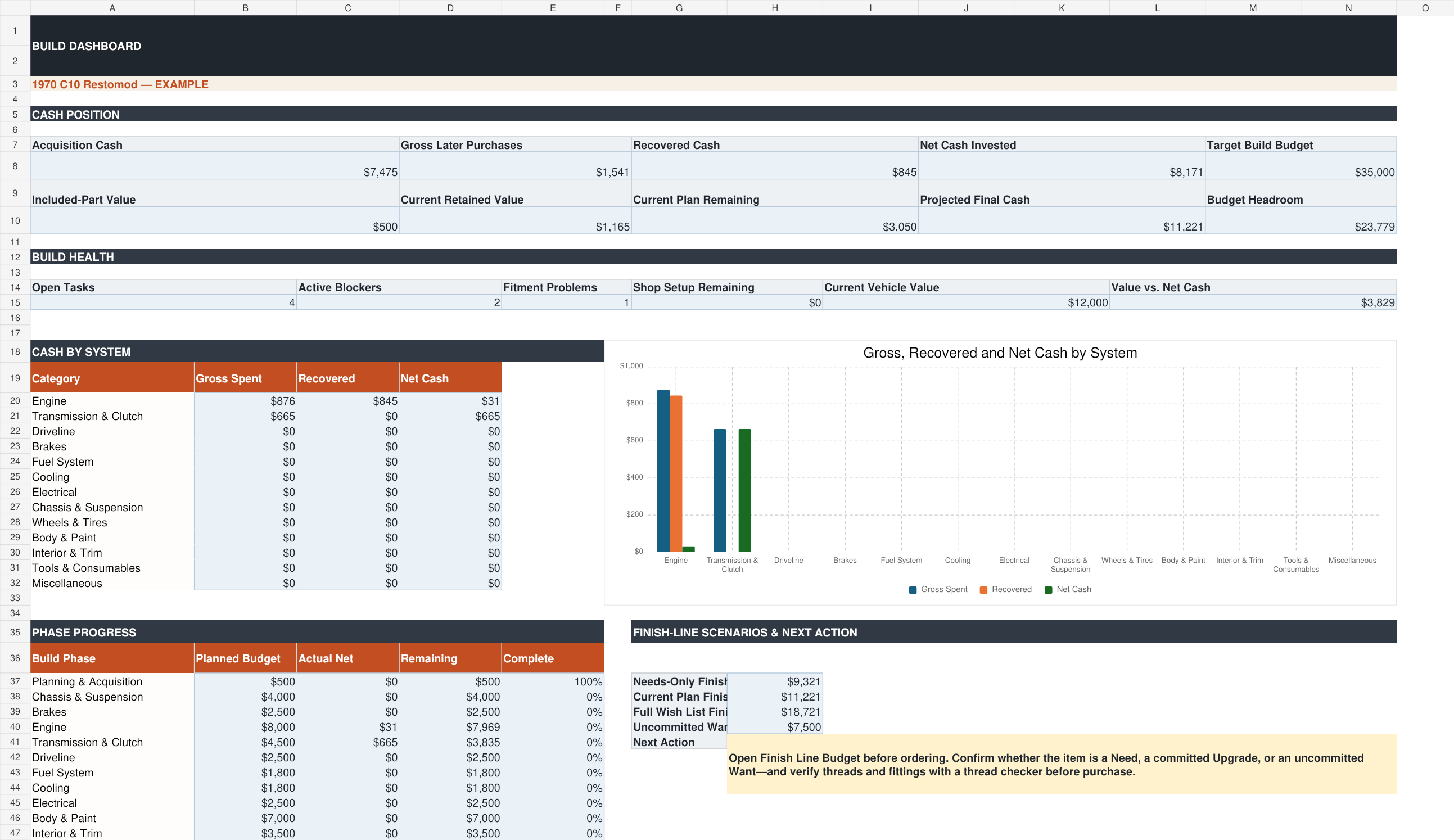
Cash position, build health, phase progress, system-level cost, and all three finish-line scenarios.

Needs, Wants, Upgrades, priority, decision status, estimated cost, linked purchases, and remaining spend.

Purchases, returns, refunds, sales, fitment, retained value, linked tasks, and future-plan IDs.

Priorities, dependencies, required decisions, target dates, costs, ownership, and true blockers.
Your download package
The included license is for personal use. Restoration shops and other commercial users will need a separate commercial license when it becomes available.
Microsoft Excel is the supported editing environment. Other spreadsheet programs may alter features or formatting.
Founding price · $39
Build the full plan, connect the purchases, and know what stands between the truck you bought and the truck you intend to finish.